
GA4 underreports most AI-driven traffic. As users come from ChatGPT, Perplexity, and Claude in 2026, a large portion of visits is lost due to missing referrer data, mobile app limitations, and privacy restrictions, often getting grouped into “Direct” traffic. Even with GA4’s newer “AI Assistant” channel, visibility is still incomplete, with much of the traffic hidden.
In reality, AI-driven visits are significantly higher than what GA4 shows; some estimates suggest up to 80% may be unattributed.
To fix this, you can build a clearer system by:
- auditing existing AI referrers in GA4
- creating a custom “AI Search” channel using regex rules
- using UTMs and estimation methods for missing attribution
- adding tools like Indexly for full AI visibility
- and building automated dashboards for tracking performance
With the right setup, AI traffic becomes measurable, structured, and actionable.
Step 1: Check If AI Platforms Already Send You Traffic
What You’re Doing
Before setting up advanced AI tracking, first check if tools like ChatGPT, Perplexity, Claude, or Gemini already send traffic to your website through Google Analytics 4 (GA4).
How to Do It
- Open GA4 → Reports → Acquisition → Traffic Acquisition
- Change the primary dimension to Session source / medium
- Search these terms one by one:
chatgptperplexityclaudegeminicopilot
- Look for referral sources like:
chatgpt.com / referralperplexity.ai / referralclaude.ai / referralgemini.google.com / referral
- Record:
- Sessions
- Engagement rate
- Date range
Important Note
Not all AI traffic is visible in GA4.
Traffic from ChatGPT mobile and desktop apps often appears as Direct traffic because some apps do not pass referral data correctly.
What Success Looks Like
You now have a simple baseline showing, which AI platforms already send visitors, how much traffic they drive, and which platforms perform best. This baseline helps measure future AI search growth and optimization results.
Example
Platform | Source / Medium | Sessions (30d) | Engagement Rate | Status |
|---|---|---|---|---|
ChatGPT | chatgpt.com / referral | 47 | 68.1% | Detected |
Perplexity | perplexity.ai / referral | 23 | 73.9% | Detected |
Claude | claude.ai / referral | 8 | 75.0% | Partial (missing mobile) |
Gemini | gemini.google.com / referral | 12 | 66.7% | Detec |
Step 2: Set Up Custom Channel Grouping for AI Referral Traffic Tracking
What You’re Doing
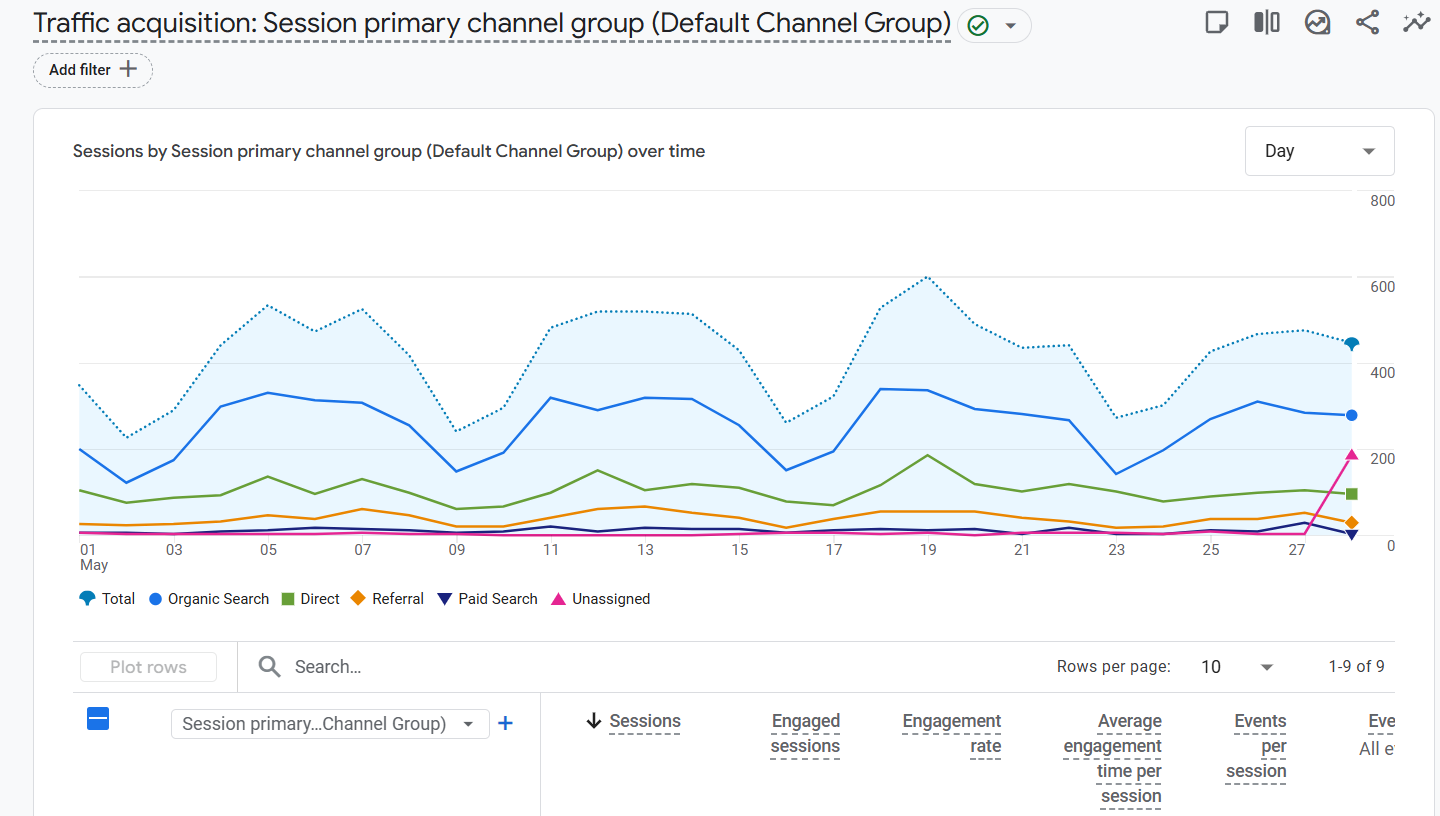
GA4 does not automatically group AI traffic into its own category. You’ll create a custom channel called AI Search to track AI referral traffic separately from normal referrals.
How to Do It
- Go to:
Admin → Data display → Channel groups - Click:
Create new channel group - Name it:
AI Traffic Channels - Add a new channel:
- Channel name: AI Search
- Set the rule:
- Dimension: Session source
- Condition: Matches regex
- Paste this regex:
chatgpt\.com|chat\.openai\.com|perplexity\.ai|gemini\.google\.com|claude\.ai|copilot\.microsoft\.com|meta\.ai- Move AI Search above the default Referral channel
- Save changes
Why This Matters
Without this setup, AI traffic gets mixed into generic referral traffic, making it harder to measure AI search performance separately.
What Success Looks Like
Your GA4 reports now show a dedicated AI Search channel where traffic from ChatGPT, Gemini, Claude, Perplexity, and other AI platforms is grouped together automatically.
Step 3: Track ChatGPT Referral Traffic Properly
What You’re Doing
ChatGPT is often the biggest AI traffic source for websites, but it’s also the hardest to measure accurately. While the ChatGPT website usually passes referral data correctly, the mobile and desktop apps often do not. As a result, some ChatGPT traffic appears as “Direct” traffic inside GA4 instead of being attributed properly.
How to Do It
Start by checking whether ChatGPT traffic already appears in your reports.
In GA4, go to:
- Reports → Acquisition → Traffic Acquisition
Search for:
chatgptopenai
You may see sources like:
chatgpt.com / referralchat.openai.com / referral
This gives you your baseline ChatGPT traffic data.
Next, create an Exploration report using:
- Session source / medium
- Device category
This helps estimate how much AI traffic comes from desktop vs mobile devices.
If you share links in newsletters, communities, or content likely to be cited by ChatGPT, use UTM parameters whenever possible. For example:
?utm_source=chatgpt&utm_medium=ai&utm_campaign=ai_visibilityUTM tags help GA4 identify traffic correctly even if referral data is missing.
You should also monitor different ChatGPT referral formats like:
chatgpt.comchat.openai.com
Grouping them into a custom “AI Search” channel keeps reporting cleaner.
Important Note
ChatGPT traffic data in GA4 is rarely complete because some app traffic strips referral information entirely. Your reported numbers should be treated as a conservative estimate, not total AI traffic volume.
What Success Looks Like
Once configured, you’ll have: a dedicated view of ChatGPT traffic, better attribution using UTM tags, cleaner reporting for AI-generated visits, and insights into desktop vs mobile AI traffic patterns.
Step 4: Set Up Perplexity Traffic Tracking
What You’re Doing
Perplexity is one of the easiest AI platforms to track because it consistently passes referral data across both desktop and mobile devices. This makes it one of the most reliable sources of measurable AI traffic in GA4.
How to Do It
Start by confirming that Perplexity traffic already appears in your reports.
In GA4:
- Go to Traffic Acquisition
- Search for
perplexity.ai
You should see:
perplexity.ai / referral
Unlike some AI assistants, Perplexity usually preserves referral attribution properly, making its traffic easier to analyze.
To understand which pages Perplexity cites most often, add:
- Landing page + query string
as a secondary dimension in your report.
This helps identify:
- Pages receiving AI citations
- High-performing AI-search content
- Topics attracting AI-driven visitors
You should also monitor engagement metrics such as:
- Engagement rate
- Session duration
- Conversions
Perplexity users often show stronger engagement because they intentionally click cited sources while researching a topic.
What Success Looks Like
You now have reliable Perplexity referral tracking, visibility into top AI-cited pages, better insight into high-intent AI traffic behavior, and clearer understanding of which content performs best in AI search.
Step 5: Fix Claude Attribution Gaps and Improve Tracking
What You’re Doing
Claude traffic is one of the hardest AI referral sources to measure accurately in GA4. While Claude is becoming a major AI traffic source, much of its traffic is either partially attributed or missing entirely. Instead of trying to achieve perfect attribution, the goal is to:
- Track visible Claude traffic
- Understand attribution gaps
- Estimate hidden traffic realistically
How to Do It
Start by checking whether Claude traffic already appears in your reports.
In GA4:
- Go to Traffic Acquisition
- Search for:
claude.ai
You may see entries like:
claude.ai / referralclaude.ai / (none)
The (none) medium usually means users copied a link from Claude and opened it directly in their browser, so GA4 could not detect referral information properly.
Because of this behavior, Claude traffic is often underreported.
To improve visibility, compare:
- Referral traffic
- Direct traffic spikes
- Landing pages receiving unexpected visits
If your team has access to server logs, you can also track Claude crawler activity by monitoring user agents like:
ClaudeBotClaude-Webanthropic-ai
This provides additional visibility into how Claude interacts with your website.
Estimating Hidden Claude Traffic
Most analytics setups miss a meaningful portion of Claude-driven visits.
A practical approach is to use visible Claude traffic as a baseline and apply an estimated multiplier for reporting purposes. Many teams use a rough estimate of:
- 2x–3x visible traffic
This helps create more realistic internal projections while acknowledging attribution limitations.
Best Practice
Focus more on: traffic trends, growth patterns, and landing page performance, instead of trying to measure exact Claude traffic numbers. If visible Claude traffic grows steadily month over month, total Claude influence is likely growing as well.
What Success Looks Like
Once configured, you’ll have:
- Claude traffic grouped inside your AI Search channel
- Better understanding of attribution limitations
- Additional visibility through server logs
- More realistic AI traffic reporting using estimation models
- Clear documentation of tracking gaps for your team and stakeholders
Step 6: Use Indexly for Advanced AI Traffic and Visibility Tracking
What You’re Doing
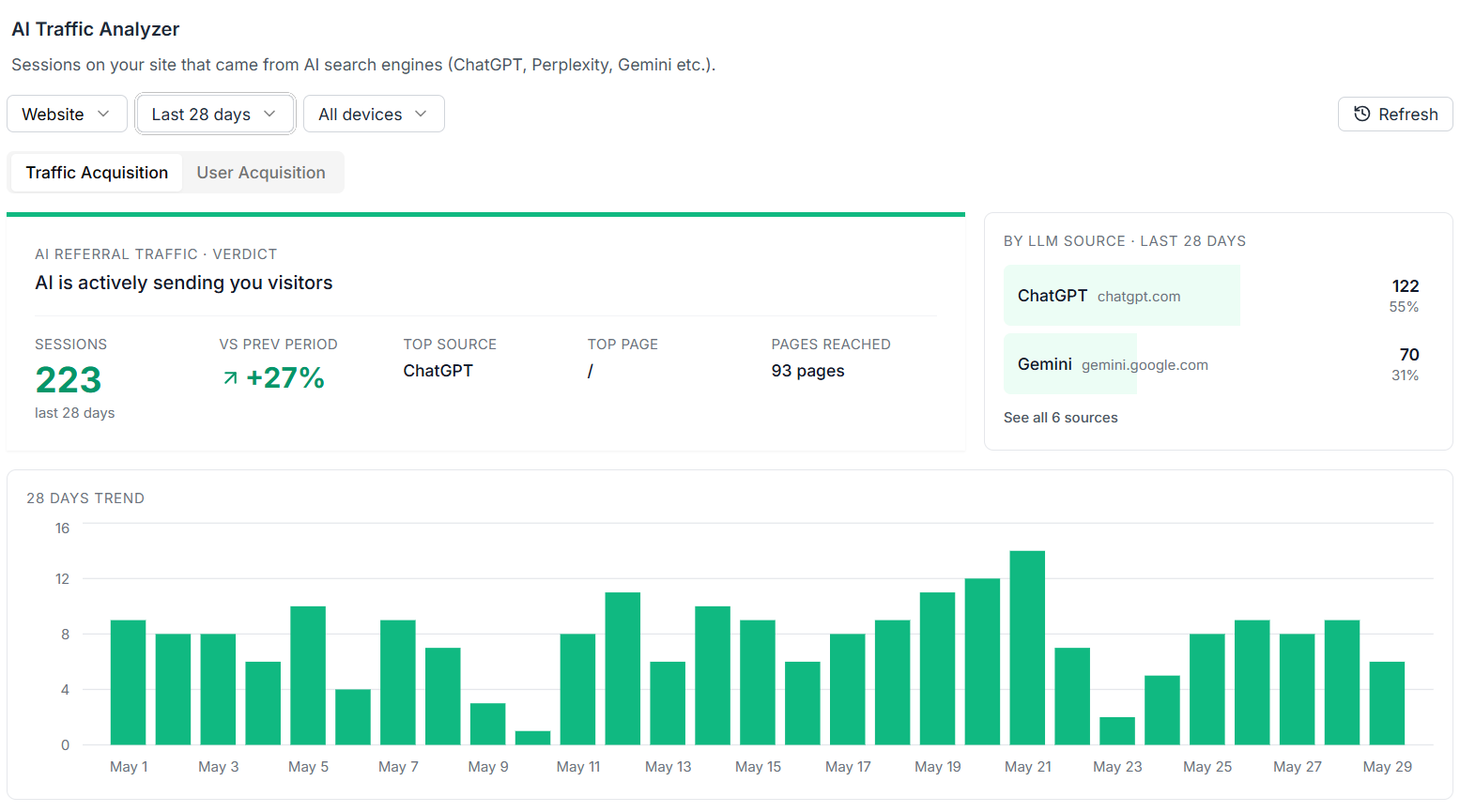
Indexly is a dedicated AI search and traffic analytics platform that helps you track how your brand appears, gets cited, and drives traffic across AI-powered engines like ChatGPT, Perplexity, Gemini, Claude, AI Overviews, and Grok.
Unlike traditional analytics tools that only show generic referral data, Indexly focuses specifically on AI referral traffic and AI visibility—showing which AI platforms are sending users, which pages are being surfaced in answers, and how that traffic performs.
It also connects AI discovery directly to real user behavior, so you can understand not just visibility, but actual acquisition, like:
- New users from AI traffic
- Active users and engagement
- Landing pages receiving AI-driven visits
How to Do It
Start by connecting your GA4 property to Indexly so AI referral traffic can be mapped to real performance data. Then configure tracking across major AI platforms.
- Connect GA4 to Indexly for unified traffic tracking
- Enable brand monitoring across:
- ChatGPT
- Perplexity
- Gemini
- Claude
- AI Overviews
- Track where and how your brand is mentioned or cited
Next, use advanced features to improve visibility and content strategy.
- Use Content Agents to:
- Identify missing topics
- Find AI visibility gaps
- Suggest content opportunities
- Enable Reddit Signals to:
- Track discussions influencing AI answers
- Understand sentiment shaping AI outputs
Best Practices
Focus on understanding the full AI funnel, not just traffic volume. The goal is to see how AI visibility turns into real users and conversions.
- Track which AI platforms drive the highest-quality traffic
- Monitor pages that receive the most AI citations
- Improve content depth and authority over time
- Optimize based on engagement, not just clicks
What Done Looks Like
Once fully set up, Indexly gives you a clear AI growth view across:
- AI referral traffic by platform
- Landing pages and acquisition sources
- New users and active users from AI channels
- Brand mentions and citation visibility
- Competitor comparisons in AI search
This turns AI traffic from a vague signal into a measurable, optimizable growth channel.
Step 8: Create Comprehensive AI Traffic Reporting
What You’re Doing
Data without context is just noise. Here, you’re turning GA4 + AI analytics tools into an executive-ready reporting system that clearly shows how AI-driven traffic is performing and contributing to business results. This helps you move from “tracking data” to “making decisions with data.”
How to Do It
- Build GA4 exploration reports
Create an Exploration view in GA4 using a referrer or source breakdown over time.
Focus on comparing ChatGPT, Perplexity, Gemini, and other AI engines.
Use stacked area charts to visualize how AI traffic share changes over time and identify which platforms are growing fastest. - Set up automated dashboards
Connect GA4 to tools like Looker Studio to build always-on dashboards.
These dashboards should automatically update and show AI traffic trends without manual reporting. - Track conversion attribution from AI traffic
Add conversion metrics (leads, purchases, sign-ups) to your AI traffic segments.
This lets you clearly see which AI platforms are not just sending traffic—but sending converting traffic. - Build executive summary views
Create simple KPI cards such as:These should be easy enough for leadership to understand in under 30 seconds.- AI traffic % of total sessions
- Month-over-month AI traffic growth
- AI-driven conversions and revenue
What Done Looks Like
You now have a live dashboard that clearly shows:
- which AI platforms are driving traffic
- how that traffic is changing over time
- how much revenue or leads it generates
It becomes a single source of truth for AI search performance inside your organization.
Step 9: Configure AI Traffic Conversion Tracking
What You’re Doing
Traffic alone doesn’t matter unless it converts. This step connects AI referral traffic directly to business outcomes like leads, signups, and revenue. It helps you answer the most important question: “Is AI traffic actually valuable?”
How to Do It
- Define AI-specific conversion events
Set up custom GA4 events such as: This helps isolate user behavior coming specifically from AI platforms.demo_request_from_aipricing_page_view_from_aisignup_from_ai
- Track revenue attribution from AI traffic
Build reports that connect AI sessions with revenue and conversions.
This is where you measure actual business impact—not just visits. - Set up goal tracking and benchmarks
Compare AI traffic conversion rates against overall site averages.
This tells you whether AI visitors are higher intent than traditional search users. - Monitor conversion quality over time
Industry benchmarks suggest AI traffic often converts significantly better than organic search.
Track this monthly to validate whether your AI strategy is improving or underperforming.
What Done Looks Like
You have a dedicated GA4 report showing:
- conversions from ChatGPT, Perplexity, Gemini, etc.
- revenue attributed to AI traffic
- conversion rates compared to organic and direct traffic
This turns AI traffic from a “visibility metric” into a clear revenue driver you can optimize and scale.
Conclusion
With these GA4 steps, you can start identifying when AI platforms like ChatGPT, Perplexity, Claude, and Gemini send traffic to your site—even though attribution is sometimes incomplete.
You’ll now have visibility into:
- which AI tools drive traffic
- which pages get cited
- which visits actually convert
Even if some traffic still shows up as “Direct,” GA4 + UTMs gives you a reliable baseline for AI-driven performance.
For a cleaner, easier understandable dashboard, use Indexly. It brings all your AI traffic, citations, and conversions into one simple view so you don’t have to piece it together manually in GA4.
FAQs
How to measure traffic and conversions from LLMs like ChatGPT, Claude, and Gemini?
Use GA4 to check Session source/medium for AI referrers like chatgpt.com, perplexity.ai, and claude.ai. Track landing pages and conversions, and use UTMs for better accuracy. Tools like Indexly help unify AI traffic and conversion tracking.
How do I increase traffic from AI Search tools like ChatGPT?
Create clear, structured, answer-focused content, build topical authority, and optimize for questions AI tools can easily cite. Strong SEO fundamentals and high-quality backlinks also improve AI visibility.
What are the best tools for tracking ChatGPT referral traffic?
GA4 for baseline tracking, Looker Studio for dashboards, UTMs for attribution, server logs for hidden traffic, and tools like Indexly for AI-specific tracking and citations.
How to measure Perplexity and ChatGPT traffic separately?
In GA4, filter by source/medium (chatgpt.com, chat.openai.com, perplexity.ai). Use a custom “AI Search” channel group to separate platforms clearly.
Can you actually track traffic from ChatGPT?
Yes, but only partially. Web referrals can be tracked in GA4, but app traffic and copied links often appear as “Direct,” making full attribution impossible without estimation tools and platforms like Indexly.
How to set up Indexly to monitor Perplexity traffic for a Content Marketing team?
Connect your GA4 property to Indexly, then enable Perplexity tracking under AI sources. It will automatically detect perplexity.ai referrals, map landing pages, and show engagement, citations, and conversions in a shared dashboard for your content team.
Are there any AI Traffic tracking tools that integrate with HubSpot for under 300 a month?
Yes. Some AI and analytics tools integrate with HubSpot via GA4, Zapier, or API connections. These setups allow AI traffic and conversions to flow into HubSpot CRM. Indexly can also be used alongside HubSpot to track AI-driven leads and attribution at a lower cost depending on plan.
How to set up ChatGPT referral tracking in Indexly?
Connect GA4 to Indexly, then enable ChatGPT tracking under AI channels. It will automatically detect chatgpt.com and chat.openai.com referrals, normalize missing attribution, and display traffic, citations, and conversions in a unified AI dashboard.