
Every piece of content you publish on WordPress means nothing to search engines until it's indexed. Indexing is the process by which search engines like Google discover, crawl, and store your pages in their database — and without it, your site simply doesn't exist in search results, no matter how strong your content is.
For marketers and brand managers, understanding how WordPress indexing works is foundational to any SEO strategy. This article breaks down what indexing actually means in a WordPress context, why certain pages get missed, and what you can do to ensure your content gets found, stored, and surfaced to the right audience at the right time.
Understanding the Concept: What is WordPress Indexing?
WordPress indexing is the process by which search engines discover, analyse, and store your website's content in their database, making it eligible to appear in search results.
A WordPress site creates multiple types of indexable URLs beyond standard posts and pages, including category and tag archives, author pages, date archives, and custom post types. While this improves content organisation, it also increases the number of URLs search engines must evaluate, raising the risk of thin content or keyword cannibalisation if not managed properly.
WordPress gives control over indexing through built-in settings and SEO plugins like Yoast SEO. You can set specific content types to index or noindex using directives. Best practices also emphasise submitting an XML sitemap and ensuring full crawl accessibility for efficient indexing.
Permalink structure also affects crawlability. Clean URLs like yoursite.com/seo-tips-for-beginners are easier for search engines to interpret than default URLs such as yoursite.com/?p=142. In WordPress, this can be configured under Settings → Permalinks, where a “post name” structure improves clarity and indexing efficiency.
How Search Engines Index WordPress Sites
Search engines index WordPress sites through a three-step process: crawling, rendering, and indexing. Understanding this flow is essential for optimising both traditional and AI-driven search visibility.
The Crawling and Discovery Process
Before a page can rank, it must be discovered. Search engines find WordPress content through internal links, external backlinks, XML sitemaps, and tools like Google Search Console.
Googlebot follows links between pages, meaning strong internal linking helps ensure all important URLs are reachable. External backlinks from trusted sites can also speed up discovery by directing crawlers to new content.
Server performance also affects crawling efficiency. Slow or unreliable hosting can reduce crawl frequency, delaying discovery of new or updated pages.
Rendering and Understanding Pages
After crawling, search engines render the page using a browser-like process to interpret HTML, CSS, and JavaScript. This allows them to see the page as a user would.
Heavy reliance on JavaScript-based page builders (e.g., Elementor or Divi) can complicate this step if key content is not available in the initial HTML. In contrast, clean, server-rendered HTML ensures faster and more reliable interpretation by search engines.
Lightweight WordPress themes with structured markup improve rendering accuracy and reduce the risk of content being missed during indexing.
Storing Content in the Index
Once rendered, search engines evaluate page content and decide whether it should be indexed. This includes analysing titles, headings, body content, internal links, image alt text, and metadata to understand relevance and quality.
Pages with thin, duplicate, or low-value content may be excluded from the index even if they are crawlable.
Content Element | How It Is Used | WordPress Location |
|---|---|---|
Page Title | Primary relevance signal | SEO plugin title settings |
H1 Heading | Defines main topic | Post or page title |
Body Text | Determines context and depth | Editor content area |
Internal Links | Helps discovery and authority flow | In-content links/menus |
Image Alt Text | Adds image context | Media library/block settings |
Meta Description | Influences SERP clicks | SEO plugin fields |
Canonical Tag | Prevents duplicate indexing | SEO plugin or theme |
Sitemaps and Robots.txt
XML sitemaps help search engines discover important URLs efficiently. In WordPress, plugins like Yoast SEO and Rank Math generate and maintain these automatically, and submitting them to Google Search Console improves crawl coverage.
The robots.txt file controls crawler access to specific parts of your site, but does not directly prevent indexing. A blocked URL may still appear in search results if it is linked externally or already indexed.
Because of this, robots.txt should be used to manage crawl behaviour, while noindex tags should be used to control what appears in search results.
Why is Indexing Important for WordPress SEO?
No matter how well a page is optimised, it cannot appear in Google unless it is indexed. Indexing is therefore the first and most essential step in SEO.
- Visibility in Search Results: Only indexed pages appear in Google search results. If a page isn’t indexed, it cannot show in search at all.
- Traffic Impact: Indexed pages are needed to generate organic traffic.
- Entry Points for Users: Each indexed page can bring visitors through different search queries.
- SEO Foundation: All SEO efforts depend on pages being indexed.
- Ranking Requirement: Pages must be indexed before they can rank or gain authority.
How Crawling and Indexing Work Together
The path from a new URL to a ranked search result follows a consistent sequence where crawling must precede indexing.
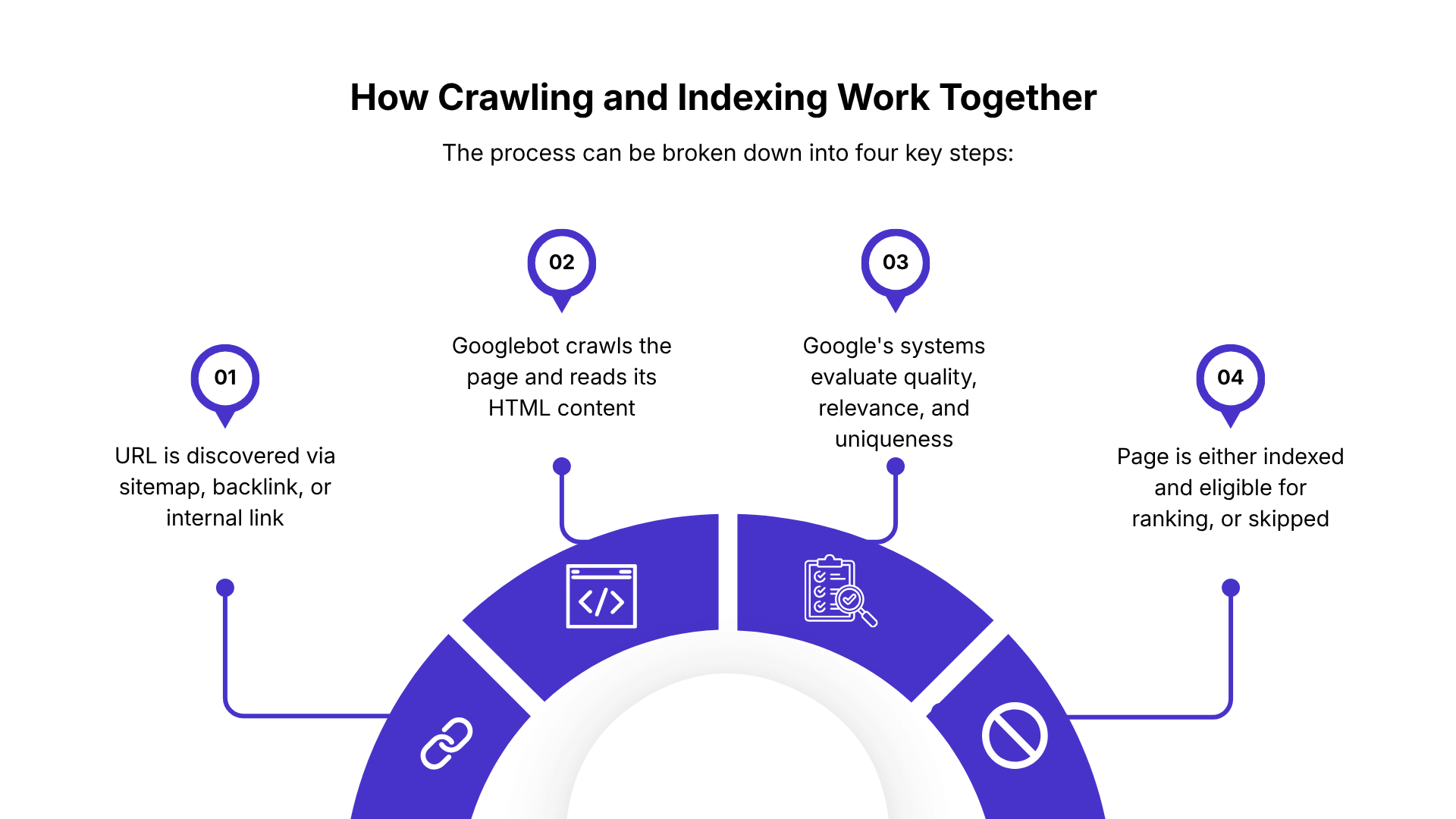
Problems at the crawling stage create a bottleneck that prevents indexing entirely. If Googlebot encounters a blocked resource—such as a JavaScript file disallowed in your robots.txt file—it may not be able to fully render the page. An incomplete render can lead to incomplete indexing or no indexing at all, hindering proper indexing efforts.
Improving crawlability directly supports better indexing coverage and visibility control. When Google Search Console data for a large WordPress site shows a high number of "Crawled - currently not indexed" URLs, the issue often traces back to crawl budget inefficiency, duplicate content, or soft 404 errors rather than a penalty or technical block.
WordPress Settings That Affect Crawling vs Indexing
| Setting / Tool | What It Controls | How It Affects SEO | Common Mistake |
|---|---|---|---|
| Discourage Search Engines (WordPress Setting) | Site-wide crawling and indexing behavior | Sends signals like noindex and HTTP headers that can prevent pages from appearing in search results | Left enabled after staging or development, causing full site deindexing |
| Meta Robots Tags (noindex / nofollow) | Page-level indexing and link-following rules | noindex prevents a page from appearing in search results; nofollow controls link crawling behavior | Accidentally applied to important pages via SEO plugins like Yoast SEO or Rank Math |
| robots.txt File | Crawling access rules for bots | Blocks or allows crawling of specific URLs or folders but does not directly control indexing | Assuming blocking in robots.txt removes pages from Google entirely |
| Google Search Console Removal Tool (related control) | Temporary removal from search results | Can hide URLs from search results even if they are still accessible or indexed elsewhere | Using it instead of proper noindex tags for permanent removal |
Top Reasons Your WordPress Site Isn't Indexed Yet
If your WordPress site isn’t appearing in search results, it’s usually due to technical settings, crawl restrictions, or discovery issues—not content alone. Before assuming a quality problem, it’s important to check how search engines are interacting with your site.
Search Engine Visibility Settings
WordPress includes a built-in option under Settings → Reading called “Discourage search engines from indexing this site.” When enabled, it can prevent indexing entirely.
Noindex Tags and SEO Plugins
SEO plugins like Yoast SEO and Rank Math allow pages or entire sections of a site to be marked as noindex. This prevents them from appearing in search results even if they are accessible.
Common mistakes include accidentally noindexing:
- Tag archives
- Category pages
- Entire post types or individual pages
These misconfigurations are a frequent cause of missing content in search results.
Robots.txt Blocking
The robots.txt file controls what search engines are allowed to crawl, but not what they index. Incorrect rules (like blocking /wp-content/ or using Disallow: /) can prevent important pages from being discovered.
However, blocking crawling does not guarantee removal from search results if URLs are already known. Proper indexing control requires noindex tags, not just robots.txt rules.
Technical Issues and Crawl Problems
Search engines have limited crawl capacity. Server errors, slow load times, broken redirects, or frequent downtime can reduce how often your site is crawled or prevent pages from being fully indexed.
If Googlebot cannot reliably access your site, new or updated pages may not get indexed at all.
Thin or Duplicate Content
Google may crawl pages but choose not to index them if the content is thin, duplicated, or low value. WordPress sites are especially affected due to archive pages (tags, categories, author pages) that often repeat similar content.
Auto-generated or low-quality pages are commonly excluded from the index.
New Sites and Lack of Backlinks
New WordPress sites often remain unindexed because search engines haven’t discovered them yet. Without backlinks or external signals, crawlers may not find the site quickly.
Submitting an XML sitemap through Google Search Console and earning a few quality backlinks helps speed up discovery and indexing.
How to Check if Your WordPress Site is Indexed
There are several reliable ways to verify WordPress indexing status.
1. Use the Google “site:” Search Operator
The fastest method is to search directly on Google using:
site:yourdomain.com
This shows a list of pages Google has indexed from your WordPress site. You can also check a specific page by entering:
site:yourdomain.com/page-slug
If no results appear, that page is likely not indexed or not yet discovered.
2. Check in Google Search Console
Google Search Console is the most accurate way to verify indexing status.
Use the URL Inspection Tool to:
- Check if a page is indexed
- View last crawl date
- Request indexing if needed
The Pages (Index Coverage) report also shows:
- Indexed URLs
- Excluded pages
- Reasons for indexing issues
3. Review Your XML Sitemap
Your sitemap helps search engines discover your pages. It is usually available at:
yourdomain.com/sitemap.xml- or
yourdomain.com/sitemap_index.xml
Compare:
- Total URLs in your sitemap
vs - Indexed pages in Search Console
A large gap often signals indexing or crawl issues.
4. Use Indexly for Continuous Index Monitoring
Indexly provides a more automated way to track indexing across your WordPress site.
Instead of manually checking multiple tools, Indexly helps you:
- Sync your WordPress URLs from Search Console
- Track which pages are indexed or missing
- Detect indexing delays and exclusions
- Monitor changes as you publish new content
This gives you a real-time overview of your site’s indexing health without needing to repeatedly cross-check multiple dashboards.
Conclusion
WordPress indexing is essential for search visibility—without it, your pages cannot appear in search results or generate organic traffic. While WordPress provides tools like sitemaps, permalinks, and SEO plugins to support indexing, issues like noindex tags, robots.txt errors, or thin content can still prevent pages from being included.
To maintain strong SEO performance, regularly monitor indexing through Google Search Console, compare sitemap coverage, and use tools like Indexly for continuous tracking. Indexing isn’t a one-time task—it’s an ongoing process that ensures your content stays discoverable and competitive in search.
FAQs
1. What is WordPress indexing?
WordPress indexing is the process by which search engines discover, crawl, and store your website pages so they can appear in search results.
2. How can I check if my WordPress site is indexed?
You can check using Google’s site:yourdomain.com search, Google Search Console’s URL Inspection tool, your XML sitemap, or tools like Indexly.
3. Why are my WordPress pages not indexed?
Common reasons include noindex tags, robots.txt blocking, the “Discourage search engines” setting being enabled, thin content, or lack of backlinks.
4. How long does indexing take in WordPress?
Indexing can take from a few hours to several weeks depending on site authority, content quality, internal linking, and crawl frequency.
5. Does submitting a sitemap guarantee indexing?
No. A sitemap helps search engines discover your pages faster, but indexing still depends on content quality and crawl evaluation.
6. What is the difference between crawling and indexing?
Crawling is when search engines discover and read your pages. Indexing is when they store those pages in their database for search results.
7. Can Indexly help with WordPress indexing?
Yes. Indexly helps monitor indexing status, track missing pages, and sync data from Google Search Console for continuous visibility tracking.