Shopify SEO: Why Your Store Isn’t Showing on Google
Shopify SEO: Fix visibility issues, boost Google search rankings, and increase website traffic.


You’ve built your Shopify store, but no one can find it. Sounds familiar? You’ve spent hours perfecting product pages, crafting detailed product descriptions, and organizing your collections, but in Google search, your store barely exists. This isn’t just frustrating, it’s hurting your website traffic, conversions, and long-term growth. Hidden Shopify SEO issues like poor indexation, content duplication, weak onpage SEO, missing image alt text, and technical problems like slow speed pages or broken canonical tags keep your products from reaching the audience they deserve.
In this blog, we’ll show why Shopify stores stay invisible in search results, the real business impact of low visibility, and actionable ways to fix it, so your products finally get seen and your Shopify SEO starts working for you.
Why Your Shopify Products Are Not Showing on Search Engines
Many store owners run into the same issue: their Shopify store doesn’t appear on Google, even after adding multiple product pages.
The reality is, visibility doesn’t happen automatically. Simply publishing products on Shopify doesn’t guarantee that Google will find or display them. If your pages aren’t properly crawled or indexed, they won’t show up in search results at all.
Even when they are discovered, weak on-page SEO, poorly written product descriptions, missing image alt text, and content duplication reduce your chances of ranking.
On top of that, technical issues like slow page speed, incorrect canonical tags, and Shopify 404 errors can further limit your store’s visibility.
The end result: your store is live, but still hard to find.
What happens when your Store has Low Search Visibility
When your store fails to appear on Google, it’s more than just an SEO gap, it directly affects your business performance.
Without effective Shopify SEO, your website traffic becomes irregular and unreliable, making it difficult to maintain steady growth.
With limited organic reach, businesses turn to paid ads to stay visible, which gradually increases costs and reduces overall profitability. Also, well-designed product pages struggle to deliver results when indexation and Shopify SEO optimisation are not properly handled.
“Paid traffic like Google Ads may convert around 3.75% on search and just 0.77% on display, showing that while ads can help short‑term visibility, they often cost more and reach fewer prospects than a strong Shopify SEO strategy.”
The Deeper Business Impact
- Missed long-term growth opportunities: Ignoring Shopify SEO issues means losing out on the compounding benefits of organic traffic over time.
- Low presence in Google search: If your store isn’t visible in Google search, you miss high-intent users who are actively looking for your products.
- Limited insights for improvement: Without sufficient traffic, SEO monitoring becomes less effective, making it harder to identify what’s working.
- Dependence on short-term tactics: Businesses often prioritize immediate results over sustainable strategies like content and Shopify blog SEO.
- Slow authority building: Without consistent visibility, building authority in your niche becomes a long and challenging process.
- Challenges in scaling SEO efforts: As your store expands, unresolved Shopify SEO problems make it harder to manage and optimize at scale.
The Real Struggles Store Owners Face with Shopify SEO
Behind every attempt to improve Shopify SEO, there’s a store owner trying to make sense of rankings, traffic, and results, but the process is rarely straightforward.
“Why are my products still not showing on Google?”
You’ve published and optimized your product pages, but your Shopify store is not showing on Google. In many cases, it comes down to poor indexation or unresolved Shopify SEO issues.
“Am I even targeting the right keywords?”
It’s hard to know which keywords will actually drive website traffic and conversions. Many store owners struggle with keyword selection, making Shopify SEO optimisation feel like trial and error.
“Why does my content feel repetitive?”
Writing unique product descriptions for multiple items is challenging, especially at scale. This often leads to content duplication, which weakens overall SEO performance.
“Do I need to rely only on paid ads?”
Without strong organic visibility in Google, many stores depend heavily on paid ads, increasing costs instead of building long-term growth through SEO.
“How do I manage SEO as my store grows?”
As your catalog expands, maintaining consistent onpage SEO across all pages becomes difficult. Scaling without a clear process leads to more Shopify SEO problems.
“How do I know what’s actually working?”
Without proper SEO monitoring, it’s difficult to track which pages are improving in Google search and which ones need attention.
Common Shopify SEO Issues Behind the Problem
Many visibility issues in Shopify stores are not caused by a single mistake, but a combination of underlying SEO problems. Understanding these common Shopify SEO issues and how to fix them, is key to improving rankings, indexation, and overall website traffic.
Your Pages Are Not Getting Indexed
Many store owners assume that once product pages are published, they will automatically appear on Google. In reality, indexing depends on how valuable and accessible your pages appear.
Pages with thin content, poor internal linking, or low authority are often crawled but not indexed because search engines don’t see enough value in ranking them.
How to solve it:
Ensure your sitemap is submitted via Google Search Console and that important pages are linked from collections or high-traffic pages. Improve content depth by adding detailed descriptions, FAQs, and unique elements. Regularly check indexing status and resubmit pages that remain unindexed.
Indexing and crawl issues affect about 25% of Shopify sites, often blocking key product pages from showing on Google.
Duplicate Content Across Product Pages
Shopify stores often use supplier-provided product descriptions, which leads to multiple pages having nearly identical content. This creates content duplication, making it difficult for search engines to decide which page is most relevant.
How to solve it:
Write unique, benefit-driven descriptions for each product. Highlight use cases, customer pain points, and differentiators. Adding reviews, FAQs, or comparison sections can further improve uniqueness and give search engines a reason to rank your page.
Weak On-Page SEO Optimization
Without proper onpage SEO, your content lacks the signals needed for ranking. Missing keywords, poorly structured headings, and lack of image alt text make it harder for search engines to understand what your page is about.
Around 60% of audited stores have duplicate or missing meta descriptions — a major on‑page SEO gap.
How to solve it:
Optimize titles, meta descriptions, and headings with relevant keywords. Structure content clearly using H1, H2, and H3 tags. Add descriptive alt text to images and ensure your content aligns with user search intent.
Slow Page Speed Affecting Rankings
A slow speed page negatively impacts both user experience and rankings. Heavy themes, large images, and too many apps often slow down Shopify stores, causing users to leave before the page fully loads.
How to solve it:
Compress images, remove unnecessary apps, and use lightweight themes. Improve loading times by minimizing scripts and optimizing performance. Faster pages lead to better engagement and improved rankings.
Incorrect Use of Shopify Canonical Tags
Shopify creates multiple URLs for the same product (especially through collections), which can confuse search engines. Incorrect Shopify canonical tags may result in the wrong page being prioritized or ranking signals being split.
About 53% of ecommerce sites have some pages with missing canonical tags, leading to ranking dilution and crawl inefficiencies.
How to solve it:
Ensure canonical tags consistently point to the preferred version of the page. Avoid linking to duplicate URLs internally and maintain a clean URL structure to consolidate ranking signals.
Inefficient Use of Crawl Budget
Search engines like Google allocate limited resources to crawl your store, known as the Shopify crawl budget. In many cases, this gets wasted on low-value pages such as filters, tags, or duplicate URLs, which prevents important product pages from being crawled and indexed efficiently.
How to solve it:
Focus on cleaning up unnecessary or duplicate pages and maintain a simple site structure. Strengthen internal linking so search engines prioritize high-value pages, and ensure your sitemap highlights only important URLs.
Broken Links and 404 Errors
Frequent Shopify 404 errors and broken links create dead ends for both users and search engines. This disrupts crawling and can negatively impact your site’s credibility and rankings over time.
How to solve it:
Regularly audit your store to find broken links and fix them promptly. Set up proper redirects for removed or outdated pages so both users and search engines are guided to relevant content.
Lack of Authority and Backlinks
Even with good Shopify SEO optimisation, your store may struggle to rank without strong authority signals. Search engines favor websites with quality backlinks, and many Shopify stores lack this foundation.
How to solve it:
Work on building authority through content, partnerships, and outreach. Publishing useful content through Shopify blog SEO can help attract backlinks and improve your credibility in search results.
Poor Internal Linking Structure
Without a clear internal linking structure, some product pages remain buried and hard for search engines to discover. This limits both visibility and ranking potential.
How to solve it:
Link related products, collections, and blog posts strategically. Make sure important pages are easily accessible within a few clicks to improve both crawlability and user experience.
Lack of SEO Monitoring and Updates
Many store owners don’t track performance after implementing SEO changes. Without proper SEO monitoring, it becomes difficult to understand why website traffic is not improving.
How to solve it:
Use analytics tools to track rankings, traffic, and page performance. Continuously update and optimize your content based on real data to maintain and improve results.
How Tools Like Indexly Help Reduce Visibility Delays
Indexly
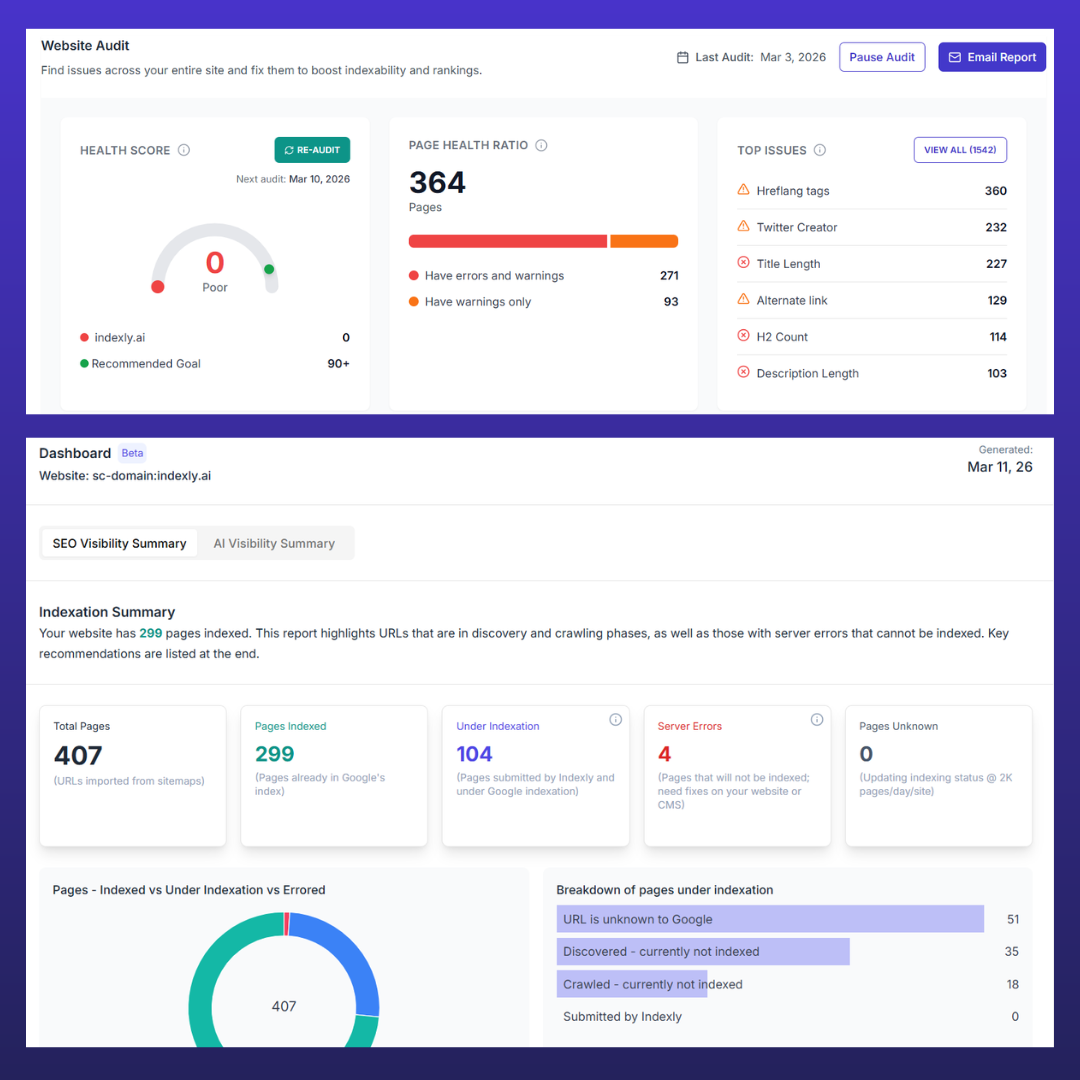
Automate indexing & fix visibility issues, track SEO, canonical tags, and crawl budget with Indexly
Many Shopify SEO issues, from poor indexation to low website traffic, aren’t caused by a single problem, but a lack of visibility into what’s actually happening behind the scenes. This is where tools like Indexly help bridge the gap between effort and results.
Instead of manually tracking everything, such platforms bring together key SEO functions in one place. Features like automated indexation ensure your product pages are discovered faster on Google, while website audits help identify technical issues like broken links, crawl inefficiencies, and on-page gaps.
Backlink intelligence supports building authority, keyword opportunities guide better content decisions, and performance tracking helps monitor what’s actually driving growth. Together, these capabilities make it easier to identify, fix, and prevent the visibility issues that commonly affect Shopify stores.
Why Analyzing and Improving Shopify SEO Is a Long-Term Game
Improving Shopify SEO is not a one-time task; it’s a continuous process that ensures your store stays visible in Google search and drives consistent website traffic.
Even after optimizing product pages, product descriptions, and fixing technical issues like Shopify canonical tags or sitemap problems, it can take time for Google to fully crawl and index your pages.
Regular SEO monitoring helps catch issues such as content duplication, slow speed pages, or Shopify 404 errors, keeping your store optimized and discoverable.
Sustainable growth also requires ongoing on-page SEO updates, maintaining a healthy Shopify crawl budget, and building authority through Shopify blog SEO.
While paid ads may bring short-term visibility, consistent analysis and improvement of your Shopify SEO ensures higher rankings, better organic traffic, and long-term success for your online store.
Conclusion
SEO is a long-term game, and making your Shopify store visible in Google search requires consistent effort. Optimizing your store, monitoring performance, and leveraging the right tools turns invisibility into discovery, driving steady website traffic and growth.
With tools like Indexly, you can speed up indexing, track SEO performance, and uncover new opportunities, helping your Shopify store go from hidden to highly discoverable faster and with less guesswork.
FAQs
1. Why is my Shopify store not showing on Google?
Many Shopify stores remain invisible due to poor indexation, weak onpage SEO, content duplication, slow speed pages, or technical issues like broken Shopify canonical tags. Optimizing product pages, improving SEO monitoring, and submitting sitemaps can help.
2. How long does it take for Shopify SEO changes to reflect in Google search?
SEO is a long-term game. Even after fixing Shopify SEO issues, changes like improved product descriptions, optimized image alt text, and better schema markup can take weeks or months to show results.
3. Can content duplication affect my Shopify store’s rankings?
Yes. Duplicate content across product pages confuses search engines, making it harder to rank. Writing unique, benefit-driven product descriptions and adding FAQs or reviews improves visibility and organic website traffic.
4. How can I improve my Shopify crawl budget?
Focus on high-value pages and remove low-priority or duplicate URLs. Strengthen internal linking and fix Shopify 404 errors to ensure search engines crawl and index your most important pages efficiently.
5. How can tools like Indexly help with Shopify SEO?
Tools like Indexly automate indexation, monitor SEO performance, uncover keyword opportunities, track backlinks, and run website audits—helping store owners fix Shopify SEO problems and increase visibility in Google search faster.