
Updated July 2026 | Estimated time: 2–4 hours to configure; ongoing publishing runs on autopilot | Difficulty: Beginner | Category: Autoblogging, Webflow Integration
What You'll Learn
This guide walks you through building a repeatable system that generates geo-optimized articles and pushes them directly into your Webflow CMS without manual work. By connecting a GEO-optimised content layer to Webflow's API, your marketing team can publish articles structured to earn citations in ChatGPT, Perplexity, Google AI Overviews, and Gemini — on a schedule, at scale.
- Generate articles that pass Technical SEO, AEO, and GEO checks before they publish
- Connect your content pipeline to Webflow's CMS API using a site token
- Map article fields (title, body, meta, slug, featured image) to the correct Webflow collection
- Trigger automatic indexing via Google Indexing API and Bing IndexNow the moment each article goes live
Prerequisites: A Webflow site on a CMS, Business, or higher plan; admin access to your Webflow site settings; and a GEO content platform that can output structured article data via API.
Why Auto-Publishing Geo-Optimized Articles to Webflow Matters in 2026
AI-referred sessions jumped 527% year-over-year in the first five months of 2025, according to Previsible's 2025 AI Traffic Report. Meanwhile, Gartner projects traditional search volume will decline 25% by 2026. The window to capture high-intent AI-referred buyers is opening just as traditional organic channels narrow.
LLM visitors convert at 15.9% from ChatGPT, 10.5% from Perplexity, and 5% from Claude, compared to 1.76% from organic search, according to Seer Interactive (June 2025). GEO techniques can boost content visibility in AI-generated responses by up to 40%, with adding statistics as the single most effective tactic at 41% improvement, according to research from Princeton, Georgia Tech, and IIT Delhi (KDD 2024).
Automating the end-to-end workflow — from GEO-optimised article generation through Webflow CMS publishing and instant search engine notification — eliminates lag between content creation and discoverability. For supporting data, see Webflow SEO and AI Optimization Guide | Technical GEO .... For related guidance, see How To Get Your Linkedin Content Cited By Chatgpt And Perplexity In 2026.
"Intuitive and a Huge Time-Saver Platform for Organic Marketing and AEO"
- Udaya P.Founder - PlugThisSmall-Business (50 or fewer emp.)
What do you like best about Indexly?
The product is very intuitive to use and saves me couple of hours of daily work that I would have spent on a resource doing inbound marketing.
What do you dislike about Indexly?
It took me about 15 mins to setup, Ideally I would have wanted it work with a click of a button.
What problems is Indexly solving and how is that benefiting you?
This is my first time using a AI monitor platform, before using Indexly, I did not know my startup Plugthis was getting mentioned in ChatGPT and Perplexity!! I was able to clearly see where my company was getting mentioned and I started to implement the suggestions the app provided. The best part for me atleast was the automated article generation, for a founder like me, maintaining my linkedin presence along with running day to day operations is a nightmare, that is where indexly helped me the most.
The Process at a Glance
| Step | Action | Time | Outcome |
|---|---|---|---|
| 1 | Generate your Webflow CMS API token | 5 min | Secure API access credential ready |
| 2 | Configure your GEO content platform | 30–60 min | Brand memory and GEO rules applied |
| 3 | Map content fields to Webflow collection | 20–30 min | Fields route correctly, no broken CMS items |
| 4 | Enable autopilot and set publish schedule | 10 min | Articles auto-publish on defined cadence |
| 5 | Activate indexing and monitor AI citation lift | 15 min setup | URLs indexed within hours; AI visibility tracked |
Total estimated setup time: 1.5–2.5 hours, with publishing running on autopilot thereafter.
Step 1: Generate Your Webflow CMS API Token
What You're Doing
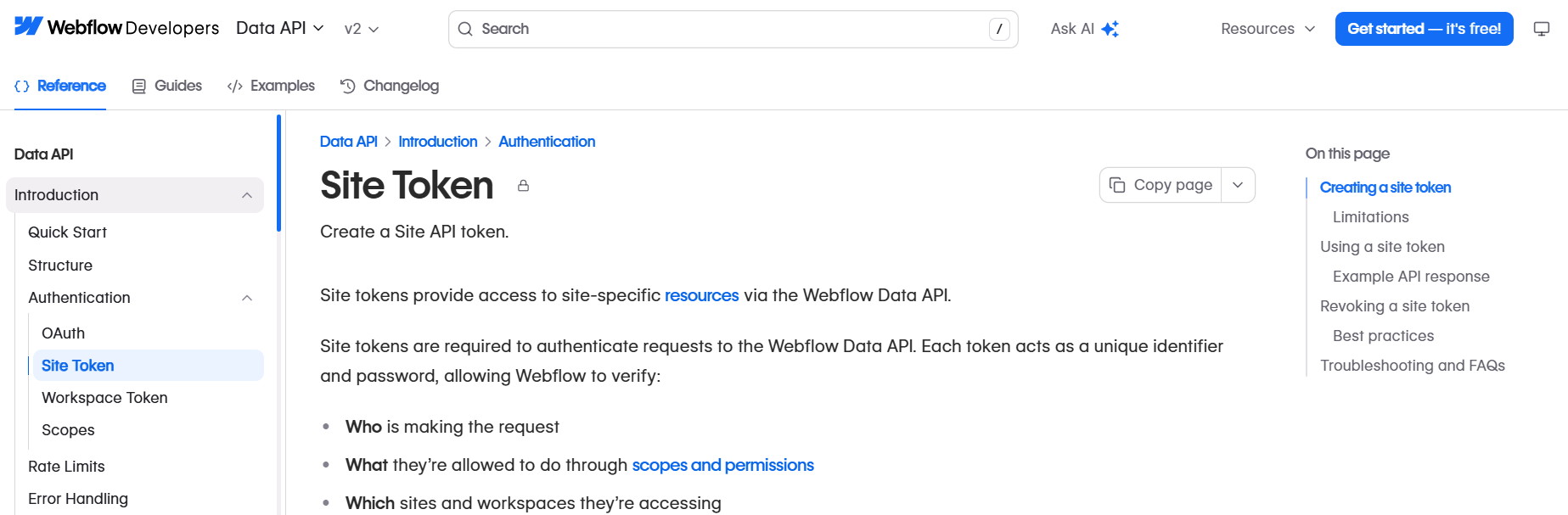
You're creating a site-level API token that allows an external platform to read and write content to your Webflow CMS collections.
How to Do It
- Open the Webflow Designer, click the gear icon to open Site Settings, select Apps & Integrations, and scroll to API access.
- Click Generate API Token. Assign scopes:
sites:read,cms:read, andcms:write. - Copy and save the token immediately — you won't be able to access it again.
- Note your Site ID. You'll need it to target the correct collection.
Best Practices
- Store the token in a secrets manager or environment variable — never in plain-text files.
- Rate limits: CMS, eCommerce, and Business plans receive 120 API requests per minute.
What Done Looks Like
You have a valid API token stored securely and can make an authenticated GET request to https://api.webflow.com/v2/sites/:site_id/collections that returns your blog collection name and ID. For a more detailed walkthrough, see How do you bulk publish AI content to Webflow CMS?.
Step 2: Configure Your GEO Content Platform with Brand Memory
What You're Doing
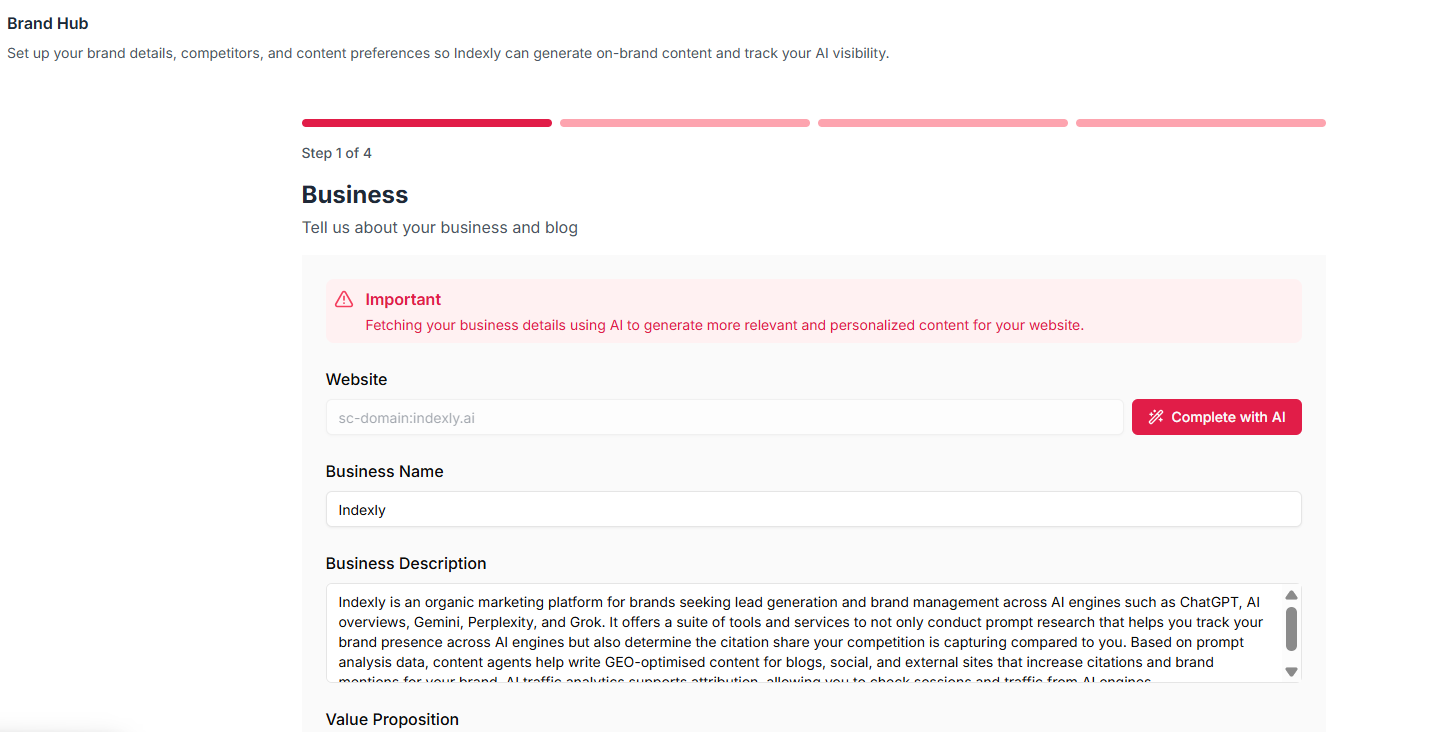
You're setting up the content engine that generates articles structured for AI citation and attaching your brand's voice, positioning, and audience context.
How to Do It
- Connect your platform to your Webflow site using the API token from Step 1. Platforms with native Webflow integration (such as Indexly) handle this via OAuth or API key flow.
- Configure Brand Memory: input your brand name, target audience, tone of voice, key differentiators, and topics to avoid. Every article should ship with Brand Memory applied, multi-format images, embedded videos, auto-discovered internal links, external citations, and full Technical SEO, AEO, and GEO checks.
- Set GEO parameters: specify target country, language, and primary search intent.
- Define content brief inputs — target keyword, supporting keywords, and article format.
Example: Brand Memory Configuration
| Setting | Example Value | Why It Matters for GEO |
|---|---|---|
| Brand Name | Acme SaaS | Ensures consistent entity mentions for AI citation |
| Target Persona | B2B Marketing Director, US | Shapes language AI engines associate with buyer queries |
| Tone | Authoritative, data-driven | Matches voice AI engines cite from expert sources |
| GEO Market | United States, English | Ensures locale-native content |
| Schema Types | Article, FAQ, HowTo | Structured data patterns AI engines pull citations from |
Best Practices
- Focus on real use cases, emerging AI search trends, and data-driven recommendations tailored to customer needs.
Content published within the last two years appears 4.3x more often in AI answers, according to Seer Interactive.
What Done Looks Like
Your platform generates a test article with schema markup, internal links, featured image, and passes GEO and AEO checks — all without manual editing. For related guidance, see How To Optimize Content For Ai Search Engines Step By Step Geo Guide.
Step 3: Map Article Fields to Your Webflow Collection
What You're Doing
You're telling your content platform which data point goes into which Webflow CMS field — preventing broken items, missing slugs, or articles without meta descriptions.
How to Do It
- In your content platform's Webflow integration settings, load your site's collection list.
- Select your blog collection.
- Map each output field from your content platform to the corresponding Webflow field using the table below.
- Test with a single draft item before enabling autopilot. Use the staged option for your first test.
Example: Standard Field Mapping
| Content Platform Output | Webflow CMS Field | Field Type | Required |
|---|---|---|---|
| Article Title | Name | Plain Text | Yes |
| Body (HTML) | Post Body | Rich Text | Yes |
| SEO Meta Title | Meta Title | Plain Text | Yes |
| SEO Meta Description | Meta Description | Plain Text | Yes |
| URL Slug | Slug | Plain Text | Yes |
| Featured Image URL | Thumbnail Image | Image | Recommended |
| Publish Date | Published On | Date | Recommended |
Common Mistakes
- Skipping the slug field: If unmapped, Webflow auto-generates slugs from titles, often breaking internal links.
- Sending plain text to Rich Text fields: Articles must include full HTML, schema markup, and meta tags.
What Done Looks Like
A staged test article appears in your Webflow CMS Editor with all fields populated correctly — no blank meta fields, no formatting errors, and a clean slug.
Step 4: Enable Autopilot and Set Your Publishing Schedule
What You're Doing
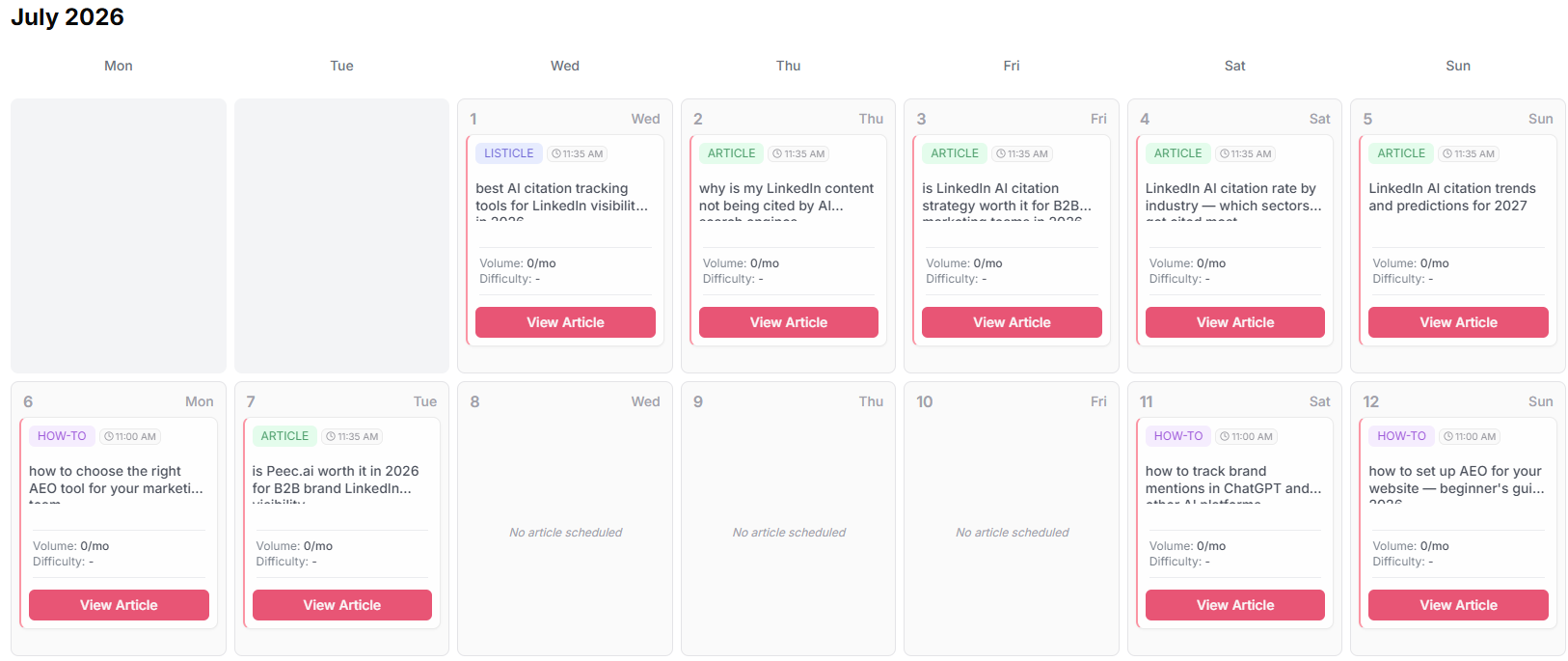
You're activating the automated pipeline so articles generate, pass GEO checks, and publish to Webflow on a defined cadence.
How to Do It
- In your content platform, navigate to autopilot or scheduling settings.
- Define a keyword queue or topic list.
- Set publish frequency. For most teams, 3–5 articles per week is sustainable and avoids rate limit issues.
- Set item creation mode to Live (not Draft) once field mapping is confirmed.
- If using middleware like Make.com or n8n, configure your scenario to trigger on schedule, generate content, and POST to the Webflow CMS Items endpoint.
Best Practices
- Use rate limiting to avoid exceeding Webflow API limits.
- Keep a keyword priority queue ordered by search volume and AI citation opportunity.
What Done Looks Like
Your first scheduled article publishes automatically to your live Webflow site at the configured time, with all fields populated and item status set to Live.
Step 5: Activate Indexing and Monitor AI Citation Lift
What You're Doing
You're ensuring every auto-published article is discovered by search and AI engines within hours — and tracking whether your GEO-optimised blog is being cited by AI platforms.
How to Do It
- Enable automatic URL submission. Indexly automatically submits URLs to the Google Indexing API and Bing IndexNow. If your platform lacks this, configure IndexNow via Bing's IndexNow API.
- Connect your Webflow site to Google Search Console.
- Set up AI citation tracking. Indexly tracks how ChatGPT, Gemini, Perplexity, Grok, Claude, and AI Overviews mention your brand, and attributes traffic through AI Traffic Analytics.
- Review your first week of published articles: check citation share, AI referral sessions, and which formats generate the most mentions.
Example: What to Track Week Over Week
| Metric | Where to Find It | Target Benchmark |
|---|---|---|
| Indexing lag (hours to index) | Google Search Console | Under 24 hours per article |
| AI citation appearances | Indexly prompt tracking | Upward trend by week 4 |
| AI referral sessions | AI Traffic Analytics | Growing share vs. prior period |
| Citation gap vs. competitors | Indexly citation gap analysis | Gap narrowing month-over-month |
What Done Looks Like
Each published article is indexed within hours, and your AI citation tracking dashboard shows the blog beginning to appear in responses from ChatGPT, Perplexity, or Google AI Overviews for your target queries.

What to Do After Auto-Publishing Is Live
Phase 1 — Stabilise (weeks 1–2): Monitor the first 5–10 auto-published articles. Confirm field mapping is consistent, slugs are clean, and meta tags render correctly. Fix any schema or formatting issues before scaling volume.
Phase 2 — Optimise (weeks 3–6): Use AI citation data to identify which article formats earn the most AI mentions. Comparison articles lead all content types with 32.5% of AI citations, followed by opinion pieces at 10%. Shift your keyword queue to favour performing formats.
Phase 3 — Scale and Refresh (month 2 onward): Every article should pass FAQ and Article schema, heading-hierarchy, and citation checks, then auto-publish to Webflow on your defined cadence. Add a content refresh agent to update older articles with new statistics, since recently updated content earns more AI citations than static posts.
Resources You'll Need
| Resource | Role | Required / Recommended | Price |
|---|---|---|---|
| Indexly | GEO content generation, Webflow auto-publishing, AI citation tracking, AI Traffic Analytics | Recommended (all-in-one) | Free to start |
| Webflow CMS | Target CMS for auto-publishing; requires CMS plan or higher | Required | From $23/mo |
| Make.com | Visual workflow automation for custom pipelines | Optional | Free tier available |
| n8n | Self-hosted automation alternative | Optional | Free (self-hosted) |
| Google Search Console | Required for Google Indexing API access | Required | Free |
See also, see Best Autoblogging Tools (2026): Auto-Publish, and .... For related guidance, see Best Ai Citation Tracking Tools For Linkedin Visibility In 2026.
Troubleshooting Common Issues
Articles Are Publishing with Blank Meta Fields
Likely cause: Meta title and meta description outputs aren't mapped to the corresponding Webflow CMS fields, or field names have been customized.
Fix: Re-open your field mapping, verify each meta field points to the correct Webflow field slug, publish a staged test item, and inspect it in the Webflow Editor.
API Returns 429 Too Many Requests Error
Likely cause: Your automation is firing requests faster than your plan's rate limit allows. CMS, eCommerce, and Business plans get 120 requests per minute.
Fix: Add a delay node between publish actions. Target one item per 2–3 seconds to stay within limits.
Articles Are Indexed But Not Appearing in AI Answers
Likely cause: Articles lack structural signals AI engines use — specifically missing FAQ schema, statistics, authoritative citations, or clear entity definitions.
Fix: Ensure your GEO content platform generates articles with FAQ schema blocks, inline statistics with named sources, and clear term definitions. GEO methods can lift content visibility by up to 40%, with statistics addition, citing sources, and quotation addition driving the biggest gains. Use Indexly's citation gap analysis to identify which competitor articles are being cited.
Webflow CMS Items Are Created as Drafts Instead of Live
Likely cause: The item creation endpoint is set to staged mode.
Fix: Switch your integration's publish mode to "Live" once field mapping is confirmed, or use the Webflow CMS publish item endpoint as a second step. For more troubleshooting advice, see 5 Webflow SEO Mistakes.
Conclusion
Key Takeaways
- Outcome: Auto-publishing geo-optimized articles to Webflow replaces a manual, error-prone workflow with a system that generates, validates, publishes, and indexes content on autopilot.
- Key insight: GEO optimisation must be baked into content generation. Articles passing Technical SEO, AEO, and GEO checks before reaching Webflow CMS earn AI citations and convert at rates up to 9x higher than standard organic sessions.
- Next action: Generate your Webflow API token, connect it to a GEO content platform like Indexly, run a staged test article, and enable autopilot.
FAQ
How do you auto-publish geo-optimized articles to Webflow?
Connect a GEO content platform to your Webflow CMS API using a site token with cms:read and cms:write scopes. Map article fields (title, body, slug, meta title, meta description, featured image) to your Webflow collection. Enable autopilot to generate articles on your keyword queue, run GEO and AEO checks, and create Live CMS items on a schedule. Add IndexNow and Google Indexing API submission to ensure discoverability within hours.
Do I need coding skills to connect a content platform to Webflow?
No. Platforms with native Webflow integrations handle the API connection through authenticated setup flows. If using Make.com or n8n, you'll work with visual, no-code interfaces.
What Webflow plan do I need for API-based auto-publishing?
You need a Webflow CMS plan or higher. The Basic plan ($14/mo) doesn't include CMS features. CMS and Business plans receive 120 API requests per minute.
What makes an article "geo-optimized" for AI search engines?
A geo-optimized article includes inline statistics with named sources, FAQ schema markup, clear entity definitions, logical heading hierarchy, authoritative external citations, and content directly answering likely AI search queries. GEO methods can lift AI citation visibility by up to 40%.
How long before auto-published Webflow articles appear in AI answers?
With Google Indexing API and Bing IndexNow activated, articles are typically indexed within 24 hours. Appearing in AI-generated answers depends on domain authority and content quality. Most teams see measurable AI citation lift within 4–8 weeks of consistent publishing.
Can I use Make.com or n8n instead of a dedicated GEO content platform?
Yes, but with caveats. They can automate publishing but don't natively generate GEO-optimised content with schema checks, FAQ structure, brand memory, or citation patterns. A dedicated platform like Indexly combines generation with GEO validation in a single workflow.
How do I track whether my auto-published articles are being cited by AI engines?
Use an AI citation tracking tool that runs your target prompts across ChatGPT, Perplexity, Gemini, Grok, and Google AI Overviews. Indexly's prompt tracking and citation gap analysis shows which prompts cite your content and which competitor pages capture citation share. Review weekly alongside AI referral session data.
What is the best publishing cadence for an autoblogging workflow on Webflow?
For most teams, 3–5 articles per week is practical. This stays within Webflow API rate limits, allows quality review in early weeks, and builds topical authority over 60–90 days. Scale to daily publishing once field mapping and GEO checks are confirmed reliable.
Methodology: This guide was researched using Webflow Developer API documentation, published GEO statistics from Princeton/Georgia Tech/IIT Delhi (KDD 2024), Seer Interactive, Previsible, and Digital Agency Network, and verified platform capabilities from Indexly. Pricing and rate limits reflect information available as of July 2026 and are subject to change.